Introduction
Gatelet is a self-hosted MCP permission proxy that sits between your AI agent and your personal services. It holds OAuth credentials in encrypted storage and enforces fine-grained YAML policies — including payload mutation.
Your agent connects to Gatelet via a single MCP endpoint and can only perform operations the policy explicitly allows. Everything else is denied. Denied tools are invisible — the agent never knows they exist.
The problem
Section titled “The problem”MCP servers give AI agents direct access to your email, calendar, and other services. Most have no permission model — it’s all or nothing. Give an agent your Gmail MCP, and it can read every email, send messages on your behalf, and access password resets and 2FA codes.
How Gatelet solves it
Section titled “How Gatelet solves it”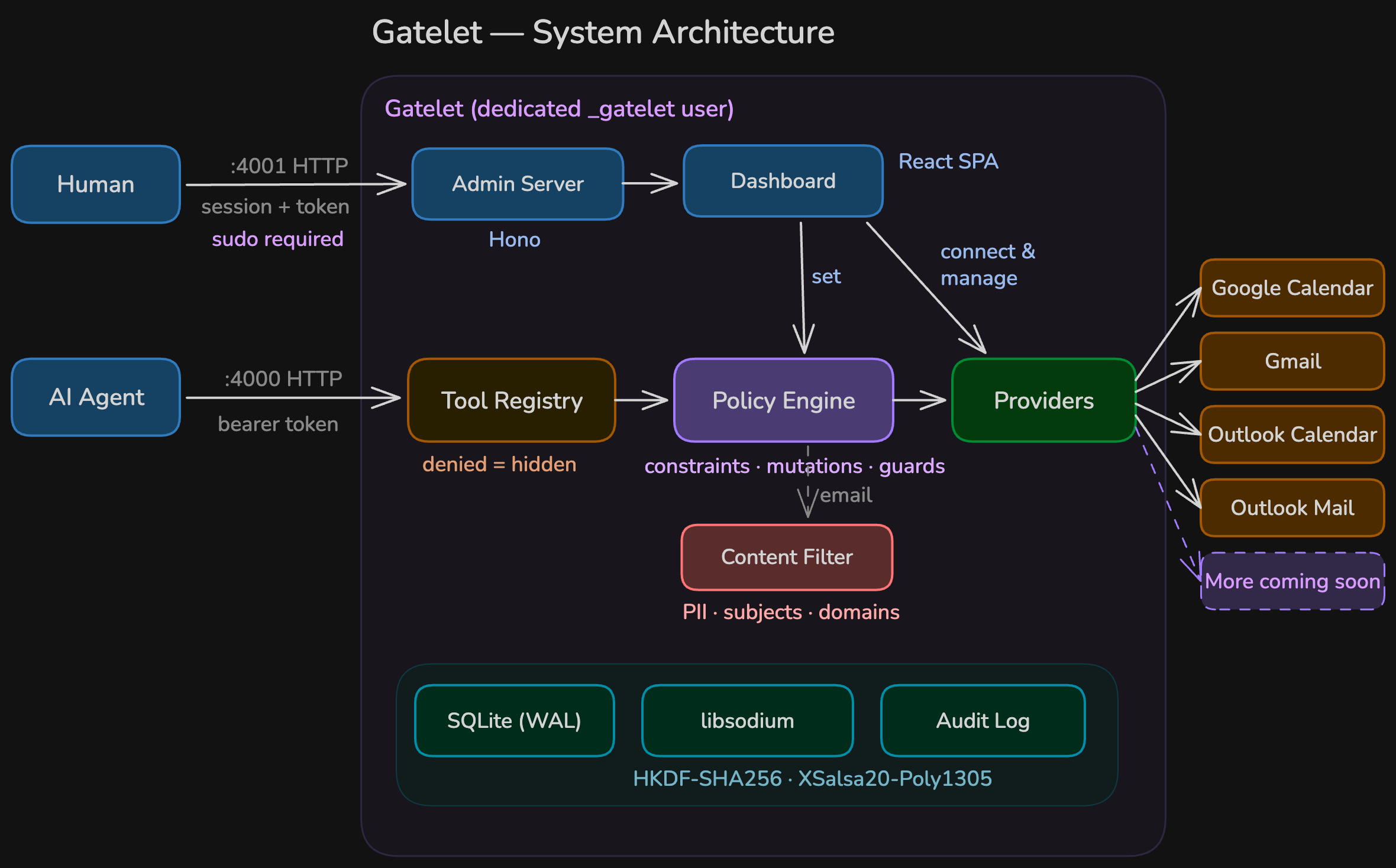
- Connect your accounts (Google, Microsoft) via the admin dashboard on
:4001 - Write YAML policies that define what the agent can do
- Agent connects to
:4000/mcpwith an API key — sees only allowed tools - Each tool call is validated against constraints, mutations are applied, then forwarded upstream
- Every call is audit-logged with parameters, result, and timing
Key principles
Section titled “Key principles”Deny by default. Operations not listed in a policy don’t exist. The agent can’t request, discover, or be tricked into using them.
Defense in depth. Delete operations aren’t just blocked — the code to execute them doesn’t exist. Send and reply exist but are disabled by default policy and hidden from the agent.
Hidden denied tools. Gatelet only registers allowed tools in MCP. A denied tool isn’t “access denied” — it’s as if it was never built. No prompt injection can bypass what doesn’t exist.
Transparent mutation. Even when an operation is allowed, mutations can strip or override fields before the upstream call. The agent never knows its payload was modified.
HTTP transport only. Gatelet runs as a separate HTTP service, never as a child process. No shared memory, no stdio, no filesystem access.
Supported providers
Section titled “Supported providers”| Provider | Operations | Built-in OAuth |
|---|---|---|
| Google Calendar | list calendars, list/get/create/update events | Yes |
| Outlook Calendar | list calendars, list/get/create/update events | Yes |
| Gmail | search, read, create draft, list drafts, send, reply, label, archive, move, list labels | Yes |
| Outlook Mail | search, read, create draft, list drafts, send, reply, categorize, archive, move, flag, list folders | Yes |
No delete operations are implemented for any provider. Absence of code is the strongest guarantee.
Next steps
Section titled “Next steps”Ready to get started? Head to Installation to set up Gatelet, then follow First Setup to connect your first account.